
Installation Tips
How to Install a Solar CCTV Camera: A Practical Guide for Kenyan Homes and Businesses
Apr 08, 2026
Admin
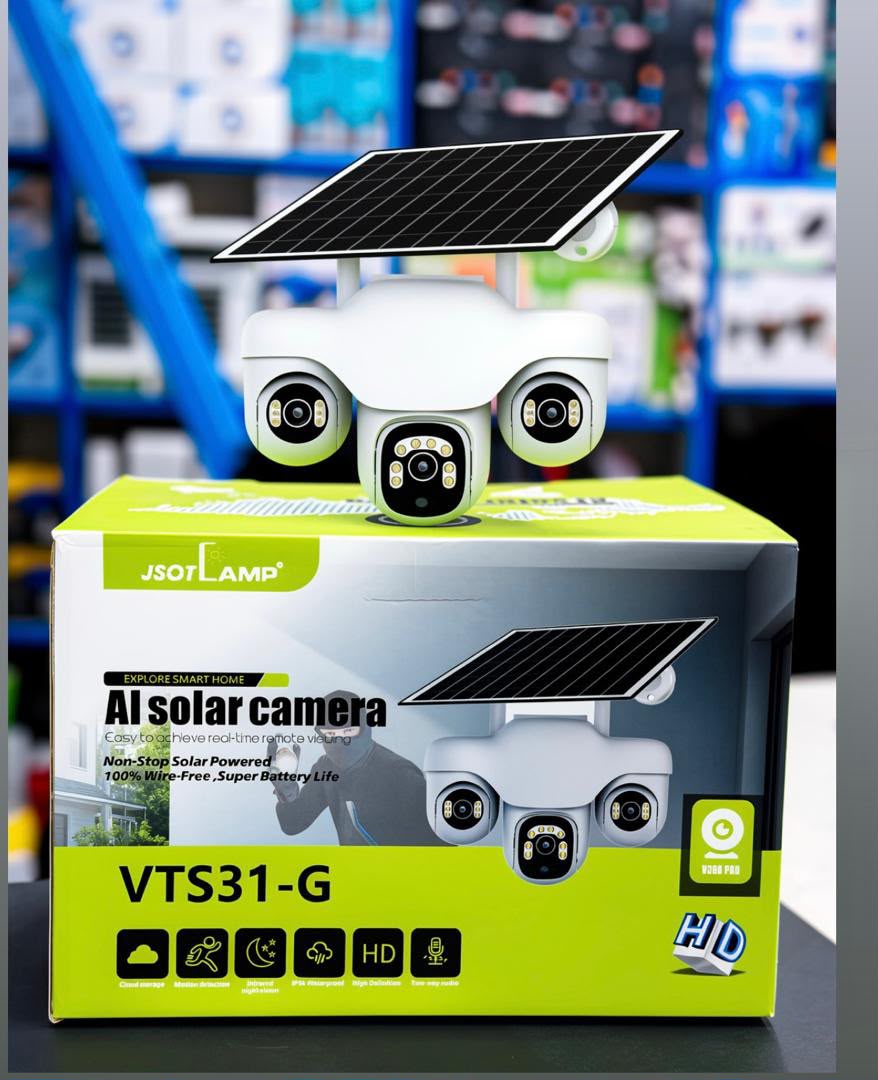
From sunlight and mounting height to SIM setup and app pairing — a practical guide to installing a solar CCTV camera so it never runs out of power.
A solar CCTV camera is a practical security solution for homes, shops, offices, warehouses, and other properties. Since it uses solar energy, it can help reduce electricity costs while providing security monitoring, even in areas where access to power is limited.
Installing one can be straightforward, but proper placement, adequate sunlight, and correct configuration are essential for reliable performance.
At Mamji Electricals Limited, we understand the importance of choosing the right security equipment for your property. Here are five important things to consider when installing a solar CCTV camera.
1. Choose the Right Installation Location
Start by identifying areas that require monitoring, such as gates, driveways, shop entrances, back doors, parking areas, and storage facilities.
For many installations, a height of approximately 3–4 metres provides a useful balance between security and clear facial visibility. However, the ideal height depends on the camera's viewing angle and the area being monitored.
Position the camera to capture important entry and exit points while minimising unnecessary views of busy roads and public footpaths. This helps reduce unwanted motion alerts and allows you to focus on activity around your property.
2. Ensure the Solar Panel Receives Enough Sunlight
Adequate sunlight is essential for keeping a solar CCTV camera powered.
Install the solar panel in an open location where buildings, trees, and roof overhangs will not block direct sunlight.
The required sunlight exposure depends on the panel size, battery capacity, weather conditions, and the camera's power consumption.
The required sunlight exposure depends on the panel size, battery capacity, weather conditions, and the camera's power consumption.
In Kenya, the solar panel should generally face north to receive good sunlight throughout the day. The correct tilt angle depends on your location and the installation requirements.
Keep the panel clean and ensure rainwater can drain away properly. Dust, bird droppings, and other debris can reduce its charging performance.
Tip: Before choosing the final mounting position, check how sunlight reaches the area at different times of the day.
3. Prepare the SIM Card and Memory Card
Some solar CCTV cameras support 4G connectivity, allowing you to monitor your property remotely through a mobile application without relying on a Wi-Fi connection.
Before installation:
- Insert an active, compatible 4G SIM card with an appropriate data bundle if your camera requires one.
- Insert a compatible microSD memory card if local video recording is supported.
- Check the manufacturer's recommended memory card capacity and formatting requirements.
- Fully charge the camera before its first use if required by the manufacturer.
- Test the camera's connection and confirm that live viewing and recording work correctly.
Remember that not all solar CCTV cameras require SIM cards. Some operate through Wi-Fi, while others support different connectivity options. Always check the specifications of your selected model.
4. Mount the Camera Securely
A properly mounted camera is less likely to shift position, become damaged, or lose its intended viewing angle.
Use the appropriate mounting bracket and fixings for the installation surface, whether it is concrete, masonry, timber, or metal. Tighten all fittings securely and position the solar panel where it can receive adequate sunlight.
For outdoor installations, ensure cable connections are protected from rain and moisture. Although many cameras have weather-resistance ratings such as IP65 or IP66, the rating and protection offered by individual connectors may differ.
Avoid installing the camera where water can collect around its connections. For installations involving high mounting points or electrical work, consider using a qualified technician.
5. Configure the Mobile App and Test the Camera
Once the camera is mounted, follow the manufacturer's instructions to connect it to the appropriate mobile application.
Depending on the model, you may be able to:
- View live footage from your smartphone.
- Receive motion-detection notifications.
- Configure motion-detection zones.
- Review recorded footage.
- Adjust camera settings and recording preferences.
Set the motion-detection sensitivity according to your surroundings to minimise unnecessary alerts. If the camera supports human detection, consider enabling it to help distinguish people from other movement.
Finally, test the camera during the day and after dark. Check the viewing angle, night vision, recording, notifications, and remote access before completing the installation.
Choose the Right Solar CCTV Camera with Mamji Electricals Limited
A solar CCTV camera can improve security around your home or business while offering a convenient alternative to conventional powered surveillance systems. However, choosing the right camera for your property is just as important as installing it correctly.
At Mamji Electricals Limited, we help customers find electrical and security solutions suited to their needs. Whether you want to secure a residential property, retail shop, office, or business premises, our team can help you explore suitable equipment.
Visit Mamji Electricals Limited
📍 Location: Jitihada Shopping Complex, 2nd Floor, Shop No. 29, Taveta Road, Nairobi CBD (Near Tea Room)
📞 Phone: +254 798 810 265
🌐 Website: mamjielectricals.co.ke
🕒 Business Hours: Monday–Saturday, 8:30 AM–6:30 PM
Contact Mamji Electricals Limited to enquire about solar CCTV cameras and other electrical products for your home or business.
Search
Categories
Recent Posts

Go Solar Today
Get a free consultation and quote for your electrical and solar energy needs.
Get a Free Quote